
♜Amazon & e-commerce
How to improve Amazon click-through rate and conversion with images (and test it properly)
Short answer: To improve Amazon click-through rate, make your main image read faster than competitors at thumbnail size: fill the frame, choose the most recognisable angle, show the pack count, and stay within the white background rules. Then lift conversion with a gallery that answers buyer questions, and confirm each change with a Manage Your Experiments A/B test.
Click-through rate and conversion rate are two halves of the same job. Your main image and title earn the click from search; your secondary images, video and A+ Content earn the sale once a shopper lands on the page. Improve one without the other and you pay for traffic that leaks away.
This guide shows where to find your real numbers in Seller Central, the image changes that most often move them, and how to test changes properly rather than guessing. If you want a second pair of eyes first, run your listing through our free Amazon listing image checker.
Want it done for you? We design Amazon listing images, from the main image to infographics and lifestyle shots, built to Amazon’s image rules. See our Amazon listing image design service.
Where to find your click-through and conversion numbers
Before changing anything, record a baseline. Amazon gives brand owners several reports that cover different stages of the funnel.
| Report | What it shows | Use it for |
|---|---|---|
| Search Query Performance | Impressions, clicks, click rate, cart adds and purchases by search term, with your brand’s share of each | Seeing whether shoppers see you but skip you |
| Search Catalog Performance | Impressions, clicks, conversion and sales by ASIN across search | Comparing products and spotting weak main images |
| Business Reports | Sessions, page views and Unit Session Percentage (units ordered divided by sessions) | Tracking detail page conversion over time |
| Sponsored ads reports | Impressions, clicks and click-through rate per keyword and placement | Quick read on image appeal for paid traffic |
| Manage Your Experiments | Units sold per unique visitor, conversion, sales and the probability that one version wins | Proving a change worked |
Search Query Performance and Search Catalog Performance sit under Brand Analytics and need Brand Registry. Read them weekly or monthly rather than daily: single days are noisy, especially for lower-volume products.
How to read the funnel
- High impressions, low clicks: shoppers see you and choose someone else. The main image, title, price, rating count or delivery promise is losing in the grid. Start with the main image.
- Good clicks, low cart adds: the page does not convince. Look at secondary images, the first three bullets and price.
- Good cart adds, low purchases: often price, delivery date or a competitor comparison at checkout, not images.
Main image changes that improve click-through rate
The main image must follow Amazon’s rules: a pure white background, the product filling around 85% of the frame, a professional photograph of the actual product, and no extra text, logos or graphics. Images should be 500 to 10,000 pixels on the longest side, and Amazon prefers more than 1,000 pixels so zoom works. Our full guide to Amazon main image requirements covers what gets a listing suppressed.
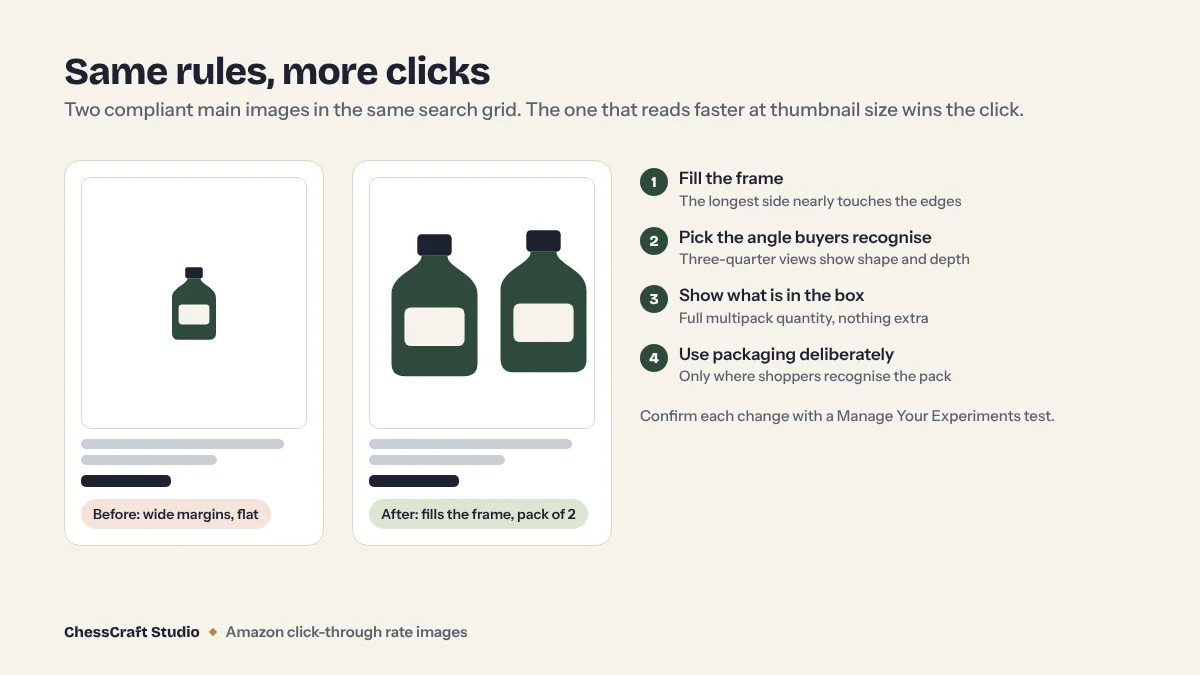
Within those rules, there is a surprising amount of room to stand out.
1. Fill the frame properly
Many main images leave wide white margins, so the product shrinks in search. Crop until the product’s longest side nearly touches the edges. On a phone grid, a few extra pixels of product size is visible.
2. Pick the angle buyers recognise
A three-quarter angle usually shows shape and depth better than a flat front view. For products where one feature decides the purchase, such as a pump on a bottle, a handle on a pan or the screen on a gadget, choose the angle that shows that feature first.
3. Show what is in the box
If you sell a multipack or a set, show the full quantity. A shopper scanning a grid trusts the picture before the title. Only show items that are included: Amazon does not allow accessories in the main image that are not part of the purchase.
4. Use packaging deliberately
For some categories the package is what shoppers recognise, such as supplements, food and beauty. For others, the product out of the box reads better. Test both. A product shown with its packaging behind it can communicate brand and quality in one frame.
5. Control light, shadow and colour
A soft natural shadow anchors the product and makes it look real rather than cut out. Colour must match the product exactly, because colour surprises turn into returns and reviews that hurt conversion later.
6. Check the competition at real size
Search your top three keywords on a phone and screenshot the first two rows. Place your candidate image in the grid. If every competitor shows the same angle, a different one can stand out without breaking any rule.
From our projects: we prepare main image options as a set of three to five variations on angle, crop and packaging, then review them inside a mocked-up mobile search grid rather than on a large monitor. Decisions made at full size rarely match what works at thumbnail size.
Secondary images that lift conversion
Once the click happens, the gallery has to answer the questions that stop people buying. Think of each slot as a reply to a likely objection.
- What does it do for me? A benefit-led infographic with three or four short claims. Our guide on what to put on Amazon infographic images shows how to write them.
- How big is it? A dimensions image with a familiar object for scale.
- Will it suit my situation? Lifestyle scenes showing the right user in the right setting.
- Why this one over the others? A comparison image or A+ comparison chart.
- What exactly do I get? A clear what’s-in-the-box shot.
- Is it good quality? Close-ups of materials, stitching, finish or ingredients.
Order matters on mobile, where shoppers swipe through images before they read bullets. Put the strongest benefit image second, straight after the main image. For more on how many images to use and in which order, see how many images an Amazon listing needs.
How to A/B test images with Manage Your Experiments
Manage Your Experiments (MYE) is Amazon’s built-in A/B testing tool. It splits visitors to your detail page randomly between version A, your current content, and version B, your new content, then reports which one sells better.
Who can use it
According to Amazon, you need a Professional selling account and Brand Representative access for a brand enrolled in Brand Registry. The product must belong to that brand and have enough recent traffic to produce valid results. Eligible ASINs appear when you start creating an experiment in Seller Central.
What you can test
Main images, titles, bullet points, descriptions and A+ Content, including Brand Story. Amazon also offers multi-attribute experiments that test several elements together. For image tests, you upload version B and select it in the tool.
How long to run it
The default setting runs the test to significance, ending when there is enough data to declare a winner. Amazon says results can arrive in as little as four weeks, and recommends 8 to 10 weeks if you set a fixed duration. Results update weekly and show units sold, sales, conversion rate, units sold per unique visitor, sample size and a projected one-year impact. With default settings, the winning version publishes automatically.
| Test order | What to change | Why this order |
|---|---|---|
| Test 1 | Main image angle or crop | Affects both click-through and conversion |
| Test 2 | Main image with or without packaging, or multipack shown differently | Builds on the winner of test 1 |
| Test 3 | Title structure | The other half of the search result |
| Test 4 | A+ Content layout or first module | Works on conversion once traffic is healthy |
| Test 5 | Bullet point order and wording | Fine-tuning after the bigger levers |
Rules for a test worth running
- Make version B clearly different. Amazon advises that the two versions should differ significantly, and the tool warns you when they are too similar. A slightly brighter photo will not produce a clear result.
- Change one idea at a time in a single-attribute test, so you know what caused the difference.
- Let it finish. Amazon warns that early results can be misleading. Do not stop a test after a good first week.
- Avoid big outside changes during the test, such as a large price cut or a new ad campaign, when you can, so the result reflects the content.
- Keep a log of every test, both versions, dates and the result. Patterns across tests are more valuable than any single winner.
Amazon updates Manage Your Experiments, its eligibility rules and its image requirements from time to time. Check the current Seller Central help pages before you plan a test programme.
What if you cannot use Manage Your Experiments?
If your brand is not in Brand Registry or a product has too little traffic, you can still work methodically. Change one image, note the date, and compare four weeks before with four weeks after in Business Reports and your ads reports, while keeping price and ad spend steady. It is not as clean as a randomised test, but it is far better than changing several things at once. For new products with little traffic, getting early opinions from people in your target audience on two or three main image options can help you choose a starting point.
Checklist to improve Amazon click-through rate and conversion
- Baseline recorded from Search Query Performance, Search Catalog Performance and Business Reports.
- Funnel stage identified: low clicks, low cart adds or low purchases.
- Main image on pure white, product filling around 85% of the frame, over 1,000 pixels.
- Main image angle chosen to show the deciding feature.
- Full pack count shown, with no accessories that are not included.
- Candidate images reviewed in a mobile search grid next to competitors.
- Strongest benefit image placed second in the gallery.
- Scale, lifestyle, comparison and close-up images covering buyer questions.
- MYE test planned with a clearly different version B and one idea per test.
- Test left to finish, with results and dates logged.
Questions
What is a good click-through rate on Amazon?
There is no single benchmark, because click rate depends heavily on category, price, keyword and ad placement. The most useful comparison is your own brand's click share against the total for the same search terms in the Search Query Performance report, tracked over time.
Does the main image affect Amazon click-through rate?
Yes. In search results the main image is the largest element shoppers see, alongside the title, price, rating and delivery promise. A main image that fills the frame, shows the most recognisable angle and makes the pack count clear often reads faster on mobile.
How long should a Manage Your Experiments test run?
Amazon's default setting runs a test until there is enough data to declare a winner, which can take as little as four weeks. If you choose a fixed duration, Amazon recommends 8 to 10 weeks. Stopping early risks acting on misleading results.
Who can use Amazon Manage Your Experiments?
Amazon says you need a Professional selling account and Brand Representative access for a brand enrolled in Brand Registry. The product must belong to that brand and have enough recent traffic for valid results. Eligible products appear when you create an experiment.
Can I put text on my Amazon main image to get more clicks?
No. Amazon's main image rules do not allow extra text, logos, graphics or badges, and breaking them can get the listing suppressed. Use angle, crop, pack count and packaging to stand out, and keep text for your secondary images.