
♜Amazon & e-commerce
Amazon A+ Content: module types, image sizes and what to put in each
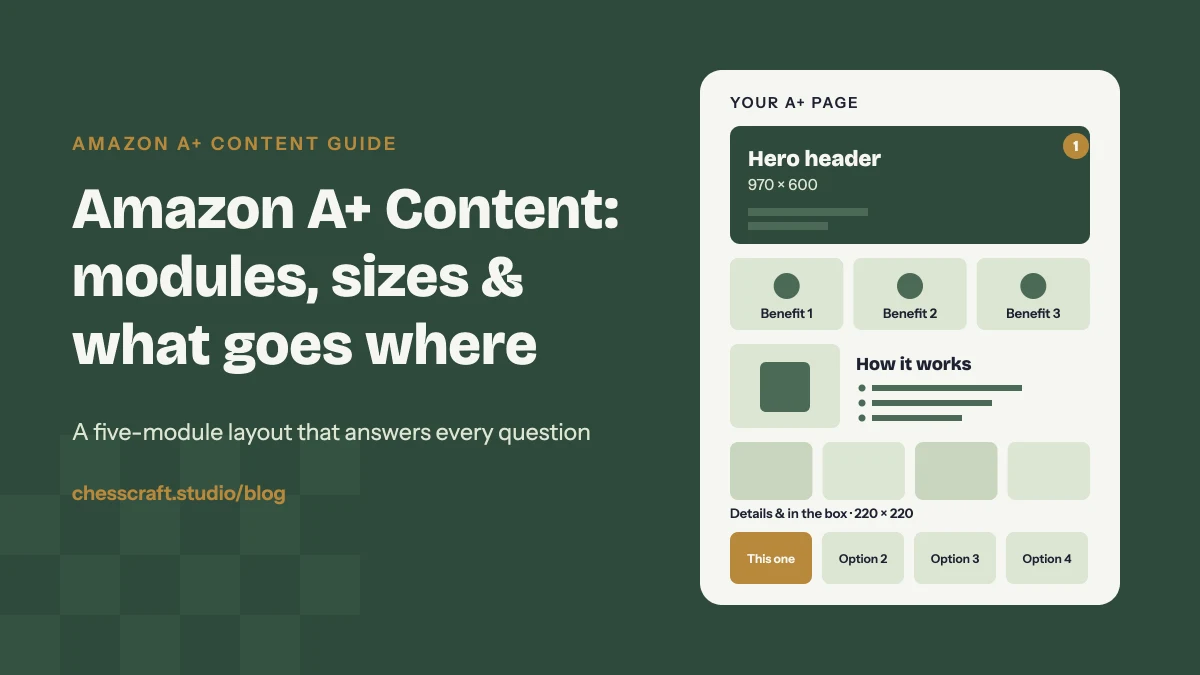
Short answer: A+ Content is the image-and-text section lower down your Amazon product page. Brand-registered sellers get up to five modules in Basic A+ (970 px wide) and up to seven in Premium A+ (1464 px wide). Use them to tell one story in order: what the product is for, why it is better, how it works, what you get, and which of your other products fit alongside it.
Your gallery images win the click and the first decision. A+ Content is where shoppers go when they are nearly convinced and want to be sure. It is also where many brands waste space, with a wall of text pasted into image modules or the same photos from the gallery stacked one after another.
Below is how we plan A+ pages in our Amazon listing image and A+ Content projects: which modules exist, the image size each one needs, and what we put in each slot.
What A+ Content is, and who can use it
A+ Content (you may still see it called Enhanced Brand Content) replaces the plain product description with designed modules: banners, image grids, comparison charts and text blocks. It is available to sellers and vendors enrolled in Amazon Brand Registry, for ASINs under the brand they own.
- Basic A+: up to five modules, built at 970 px wide.
- Premium A+: up to seven modules at 1464 px wide, with extra options such as video, hotspots, carousels and larger comparison tables. Amazon decides which brands qualify and shows it in A+ Content Manager; the conditions have changed over time.
- Brand Story is separate: a swipeable brand carousel that sits on the page alongside your A+ Content and can be applied across your catalogue.
Every submission is reviewed by Amazon before it goes live, so build in a few days for approval.
Standard modules and their image sizes
These are the modules most brands use. Sizes are the dimensions the A+ editor asks for, in pixels.
| Module | Image size and best use |
|---|---|
| Company logo | 600 × 180 Your logo on a clean background. Useful at the top if your brand is still building recognition. |
| Image header with text | 970 × 600 The hero banner. One strong lifestyle or product image with a short headline. |
| Image & light text overlay | 970 × 300 A wide mood strip with a single line of text. Good as a section break. |
| Three images & text | 300 × 300 each Three benefits side by side, each with a short caption. |
| Four images & text | 220 × 220 each Features, steps, flavours or what's in the box. |
| Single image & highlights | 300 × 300 One product shot with a bullet list beside it. Ideal for "how it works". |
| Comparison chart | 150 × 300 per product Your product next to other products from your own range. |
| Text / technical specs | No image Plain text or a spec table for details that don't need a visual. |
| Premium full image | 1464 × 600 Premium A+ only. Edge-to-edge banners that feel like a brand website. |
Amazon updates the A+ editor from time to time, and Premium modules vary by marketplace. Always check the size shown in A+ Content Manager in your own account before you design, and upload at exactly that size so nothing gets cropped or softened.
A five-module layout that works for most products
If you only have Basic A+, five modules is enough to answer the questions that are left after the gallery. This is the order we start from, then adjust per product.
1. Hero header (970 × 600)
The product in use, with one headline that says who it is for or the main promise. Not the white-background main image again; shoppers have already seen that.
2. Three key benefits (3 × 300 × 300)
The three reasons to buy, each as a picture plus five to eight words. Write benefits, not features: "stays cold for 24 hours" rather than "double-wall vacuum insulation".
3. How it works or how to use it (single image & highlights)
One clear image with three or four short steps or points beside it. This is where you prevent the questions that turn into returns.
4. Details and what's in the box (4 × 220 × 220)
Close-ups of materials, finish or ingredients, or every item included laid out clearly.
5. Comparison chart
Your product next to two to five others from your own range, so a shopper who is unsure can pick the right one without leaving your brand.
With Premium A+, the extra two modules usually go to a short product video and a second wide lifestyle banner.
Design tips that make A+ Content actually get read
Design for a phone first
A 970 px banner shrinks to the width of a phone screen, so text inside images gets small fast. Keep headlines large and short, use high contrast, and put longer explanations in the module's text fields rather than baked into the image.
Extend the gallery, don't repeat it
Your listing images should cover the essentials. A+ is for depth: the story behind the product, use cases, detail shots and the rest of your range. Use the same fonts, colours and icon style across both so the page feels like one brand, which is why we usually design listing images and A+ together. Planning the gallery as well? Here is what to put on Amazon infographic images.
Fill in the image keywords
Each image has an alt text field (image keywords), limited to around 100 characters. Describe what is in the image plainly and naturally. Don't stuff it with keyword lists.
Avoid what usually gets rejected
- Prices, discounts, promotions or shipping details.
- Customer reviews, quotes or star ratings.
- Guarantee or warranty claims, and words like "best-selling" or "#1".
- Links, website addresses or contact details.
- References to competitors or other sellers.
- Low-resolution images or text that is hard to read.
This is a summary of what we see flagged most often, not the full rulebook. Read the current A+ Content guidelines in Seller Central or Vendor Central before submitting.
Checklist before you submit
- Every image at the exact size the editor asks for.
- Headlines readable on a phone without zooming.
- No module repeats a gallery image as-is.
- Benefits, how it works, details and your range are all covered.
- Image keywords filled in for every image.
- No prices, reviews, guarantees, links or competitor mentions.
- Fonts, colours and style match your listing images and packaging.
Questions
Who can create Amazon A+ Content?
Sellers and vendors enrolled in Amazon Brand Registry can create A+ Content for products under the brand they own. You build it in A+ Content Manager in Seller Central or Vendor Central.
How many modules can A+ Content have?
Basic A+ allows up to five modules and Premium A+ allows up to seven. Premium also adds larger 1464 px modules, video and interactive options for brands Amazon makes eligible.
What size should A+ Content images be?
It depends on the module. The header is 970 × 600 px, three-image modules use 300 × 300 px, four-image modules use 220 × 220 px, the logo is 600 × 180 px and Premium full-width images are 1464 × 600 px. Check the editor in your account for the exact size of each module.
How long does A+ Content take to be approved?
Amazon reviews every submission before it goes live, which usually takes a few days and can take up to about a week. If it is rejected, Amazon tells you which part to fix.
Can I use the same A+ Content on several products?
Yes. You can apply one A+ project to multiple ASINs, which works well for variants. For different products, a tailored page usually answers shoppers' questions better.